Mobile Completely Revamped Plus Several Other Enhancements - Oct 22, 2013
Mobile Revamped (screenshots below)
1) New Menu - Appears to the side for quick access.
2) New Simplified Button Displaying System Communication for a cleaner look.
3) Full Screen Option activated upon login or by clicking on the Dealer Name in the header bar.
4) Ready for Chrome Mobile App Mode once Google releases it from beta. - Homescreen icon will load in its own window with no visible notice of the browser window just like it does now on the iPhone.
5) New Event & Status Icons - Visually see the status and events at quick glance. Users images also shown if applicable.
6) HVAC, Lights, & Tasks Added with Full Control Commands - Previously only supported in the full browser version.
Mobile: Activity
Mobile: Arm/Disarm
Mobile: Zones & Sensors
Mobile: Doors & Outputs
Mobile: Cameras
Mobile: HVAC
Mobile: Lights
Mobile: Ta...
[Read More]
New Enhancements to Monitor - Oct 04, 2013
We've upgraded the look and feel of each screen in the monitor section.
See example screenshots below.
Activity
Areas
Zones & Temperature Sensors
Doors & Outputs
HVAC
Lights
Tasks
...
[Read More]
New Improvements to the Mobile Version - Sep 18, 2013
3 Ways to save bookmarks to the homescreen
1) Store with url, https://www.connectmysites.com/m
2) Store from the login screen
3) Store from the page of your choice
If you store the bookmark with options 1 or 2, then the last page will be remembered and each time clicking the icon on the home screen will take the user directly to the last page they left. For instance, if they last left on the arm/disarm screen then that's the first page to load. Previously, the last page was not remembered so the first page to load was the recent activity page.
If you store the bookmark with option 3, then this will be the page they will always go to regardless of what page they left on. For instance, if they always want to go straight to the arm/disarm page then store the bookmark from that p...
[Read More]
New Energy Management & Lock Control utilizing DMP Z-Wave - May 20, 2013
DMP Z-Wave Status & Control Available on both Connect ONE LIMITED and PRO
Security Management
Z-Wave Locks
View Status including Battery Level & Control
Energy Management
Z-Wave Thermostats
View Status including current operation state, i.e. if the furnace or a/c is running & Control
*Automatic or Timed set to Energy Conservation Mode based upon current arming mode
*Automatic Sync of Date/Time once per day
*Customer Controllable Display Lock Setting (Trane/RCS Z-Wave Thermostats)
* Connect ONE Exclusive Feature
Z-Wave Lighting
View Status & Control including Dimmer Control
Task Management
Activate Predefined Z-Wave Favorites - A favorite consists of a grouping of devices and actions to be performed. For example, one favorite can be programmed to turn on all outside lights. This can be activated with a single-click in Connect ONE.
The DMP Z-Wave Locks, Thermostats, &...
[Read More]
User Scheduling through the use of Custom Settings in the ELK M1 Control Panel! - Apr 29, 2013
Now you can create a rule for unlocking a door, disabling users, controlling an output, etc. and through the use of custom settings your customer can control the timing of the rule via Connect ONE. For example, you can create a rule to turn on an output (door) when the custom setting "door unlock" equals time of day, and turn off output (door) when custom setting "door lock" equals time of day. The two custom settings, "door unlock" and "door lock" are configurable in a schedule by your customer. Now they can adjust their unlock and lock times without requiring any dealer intervention. Up to 20 custom settings can be configured.
The new Scheduling feature is available to all Connect ONE PRO Customers.
...
[Read More]
Improved User Experience on the Monitor Status Screens - Apr 25, 2013
Improved User Interface on Monitor Status Pages. Now when a user navigates to the monitor section and clicks on a page to view status, such as Zones, if any zone status hasn't been updated recently, Connect ONE will automatically issue the necessary commands to the control panel to update the status. While this is happening a "Refreshing.." message appears to tell them what is happening and the message updates to "Refresh Done" once complete. This process works on both the full browser site and the mobile site and for both the LIMITED and PRO versions of Connect ONE.

DMP XR150/350/550 Panels Now Supported! - Apr 02, 2013
We're pleased to announce that the new DMP XR150/350/550 panels are now fully supported. These new panels have many exciting new features, including:
Improved 10/100 network connection, previously only 10 megabit
Up to 4 profiles per code
Up to 8 schedules per profile
Easy reuse of Time Schedules for Areas, Doors, Outputs, and Profiles
We've also added a new feature for all DMP systems. Now Connect ONE will update the time and date of any model DMP panel once per day. Previously only the receiver programmed as path 1 in the control panel was used to update the time. This was primarily the panel's central station receiver. Now you can be assured that Connect ONE will update the time of all panels regardless of the central station to ensure an accurate clock....
[Read More]
Announcing New Version - Connect ONE LIMITED - Mar 13, 2013
Quick & Easy to Use
View Recent System Events
System Status
Arm/Disarm
Bypass
HVAC, Lights, Outputs, & Task Control
No Software to Load or Maintain
Works with Any Web Enabled Device - Computer, Smartphone, Tablet, etc.
No Apps to Buy
Build & Retain a Loyal Customer Account Base
Works with
Promotes Standardization of Training & Support
Eliminates the Need for a Second Technician
Easy Way to Test & Control System Points - View Zone Status, Arm/Disarm Alarm, etc.
Same Look and Feel as
Easily Upgradable to
Multi-User Login
Full User Management
Reporting
Notifications
Scheduling & More
Universal Browser & Mobile Compatibility
...
[Read More]
Batch Holidays to Multiple Control Panels! - Feb 15, 2013
In response to a feature request we've added a new feature which allows your customers to batch their holidays to all of their control panels for quick & easy management.

New Report - Exit Exception by User- See Who's In the Building! - Jan 14, 2013
In response to a feature request we've added a new report called Exit Exception by User. Your customer can use the report to see who has logged into the building but not yet logged out. They can run it at any time to see a current snapshot or they can run it for past days to see who is not properly swiping to leave at the exit reader. It works best when you have installed entry and exit readers however it can be used without exit readers as well. The difference being you wouldn't know if the person left but you would know that at some point they logged in today. The request was for a report to run in case of emergency and they could get a list of everyone still logged in. However it can also be used in non-emergency situations by a receptionist or anyone lo...
[Read More]
Quick & Easy Technician Testing! - Jan 07, 2013
SmartTest
TM is an easy new way for technicians to test and control system points, (zones, doors, areas, & outputs), on their smart phone. How many times have you been working on a zone at a far point of the building, on a lift, at a splice in the attic, etc. and wished you had someone at the keypad relaying the status. Now you can have that convenience without needing a second tech. Just use the newSmartTest
TM feature from your smartphone and watch the status of the zones in real-time. You can even arm/disarm an area, unlock/lock a door, turn on/off an output in real-time for easy troubleshooting.
How it Works:
When the SmartTest
TM feature is started, Connect ONE
R is instructed to open and hold a connection...
[Read More]
Send Lockdown to Multiple Systems from PC or Mobile! - Jan 07, 2013
In response to a feature request from a customer with multiple buildings on their campus, your customer can now perform a lockdown to multiple systems from a single page. They can even send this command from the mobile version which allows quick access form a smartphone since they can choose to stay logged in from a previous session. We welcome and appreciate the feedback from our dealers.
DMP XR100/500 Systems:
Upon a lockdown the following actions will be performed:
1) An event will be logged stating the user which performed the lockdown on the selected system.
2) A lock all doors command will be sent to the control panel. Including any outputs configured as a door.
3) A system profile deactivation command will be sent for each profile that maps to the pre-selected login profile. This actually deletes the profile from the control panel however in Connect ON...
[Read More]
Account Linking Feature Available! - Dec 20, 2012
We pioneered and patented the ability for your customers to see and control multiple sites with a single login. We did this by merging the information from the locations into the same screens and allow flexible control to tailor the permissions. This works great when you have multiple locations under the same company. But what if you have a customer who owns multiple companies or a consultant who manages multiple companies, or even when multiple installing dealers enter the mix? The solution is account linking. Customers will now be able to link user accounts for easy access to switch between them without having to manually log in and out and constantly type in their login details.
This was originally developed as a solution for a customer whom has multiple installing dealers because of a wide geographic footprint and allows them the convenience of linking their accounts. Howeve...
[Read More]
NEW Connect ONE Features Available! - Nov 14, 2012
Show and Control Areas
A new option has been added on the dealer site for each Control Panel (Device) Area. You now can easily hide areas such as access only areas to the customer with the following options:
Show & Control: Shows the Area and Allows Arm/Disarm Commands
Show Only: Shows the Area and Disables Arm/Disarm Commands
Do Not Show: Hides the Area Entirely
This allows you to create additional access or custom areas without confusing the customer with more arming/disarming choices that may be irrelevant.
Assign Installer Code to the Dealer User
Now you can easily hide your installer code(s) from the customer by assigning them to a dealer user. The available dealer users will be at the end of the list.
Refresh Status on the Mobile Site
Now there is an option to send the refresh status from the mobile site, previously only available o...
[Read More]
Increase Your RMR - Connect Any IP Camera for Live Video Integration Now Supported! - Sep 13, 2012
Integrated Devices
NEW Any IP Camera/Encoder/DVR
IP video device must be able to deliver a snapshot via url (most cameras support this feature)
Examples:
Axis IP Camera / Encoder
ACTi IP Camera
Geovision NVR/DVR
Analog or IP Cameras
Ganz DR Series Standalone DVR's (DR4H, DR8H, DR16H)
Analog Cameras
Exacq Hybrid/IP NVR's (all model variations)
Analog or IP Cameras
Others may be available upon request
Cameras Page
View Thumbnail Images from Multiple Sites on the Same Screen
Click on one or multiple thumbnails to open a live video window
Organize and Arrange Live Video Windows anywhere on the screen
View Cameras Link on the Activity Page
View one or more Live Cameras on the same screen as Security & Access Events
View activity and camera view with related user picture ID – protection against lost or shared car...
[Read More]
ELK M1 fully integrated with Connect ONE! - Sep 12, 2012
The ELK M1 is a flexible security, access control, and automation panel. It allows not only security and access control but also interfaces to hvac thermostats, lighting, and door locks. The interfaces can be wired or wireless, such as z-wave or Radio RA. Your customers can now control all of these devices right from their Connect ONE interface, ELK also provides a sleek touchscreen for convenient control. The ELK M1XEP ethernet module is required and a special firmware must be loaded, firmware available free of charge via download from ELK.
Integration Capabilities
View Real-Time Activity
Arm/Disarm Areas
Bypass Zones, View Status & Zone Temperatures
Control Doors (Access & Z-Wave)
Control Outputs
Control Thermostats
Control Lighting
Activate Tasks & Keypad Shortcut Keys
Generate Activity Reports (Security/Access/HVAC/Lighting)
Generate Historical Temperature Log Re...
[Read More]
Increase Your RMR - Geovision NVR/DVR Live Video Integration Now Supported! - Sep 11, 2012
Integrated Devices
NEW Geovision NVR/DVR
Analog or IP Cameras
Ganz DR Series Standalone DVR's (DR4H, DR8H, DR16H)
Analog Cameras
Exacq Hybrid/IP NVR's (all model variations)
Analog or IP Cameras
Others may be available upon request
Cameras Page
View Thumbnail Images from Multiple Sites on the Same Screen
Click on one or multiple thumbnails to open a live video window
Organize and Arrange Live Video Windows anywhere on the screen
View Cameras Link on the Activity Page
View one or more Live Cameras on the same screen as Security & Access Events
View activity and camera view with related user picture ID – protection against lost or shared cards
...
[Read More]
Connect ONE Mobile Version Release! - Aug 16, 2012
The mobile version is available by going to https://www.connectmysites.com/m or by clicking on the mobile link from the full version (link shown if you're on a mobile device). It allows your customer to see and control the Monitor section from the full version but is enhanced for mobile devices such as smart phones and tablets. We've also added some other usability features such as an option to "Stay Signed In", this will not timeout the session so your customer does not have to repeatedly login. Also, the IP address tracking is disabled for the mobile version, so that they do not get logged out while roaming between wifi and cellular coverage. These features make it very useful for your customer to add a bookmark icon on their home screen to quickly access the mobile version without needing to ...
[Read More]
New Profile Options - Your Customers Have Even More Control! - Aug 08, 2012
A new Event Type has been added, Access Violation: Unauthorized. This can be triggered by setting the user's login profile with a system activity restriction, either by area or by schedule. If a user attempts to use their code/card/fob to arm, disarm, or access at an invalid area or at an invalid time, they may be allowed by the control panel however an event will be generated indicating the violation. Your customer can receive these violations just like any other event via email/text message, delivered in a report, etc.
Your customer now can also restrict a user's login based upon a schedule. If a user attempts to login outside of the allowed times they will be denied and an event will be generated logging their attempt. This will ensure that lower authority personnel, such as HR, can only make changes during normal business hours.
...
[Read More]
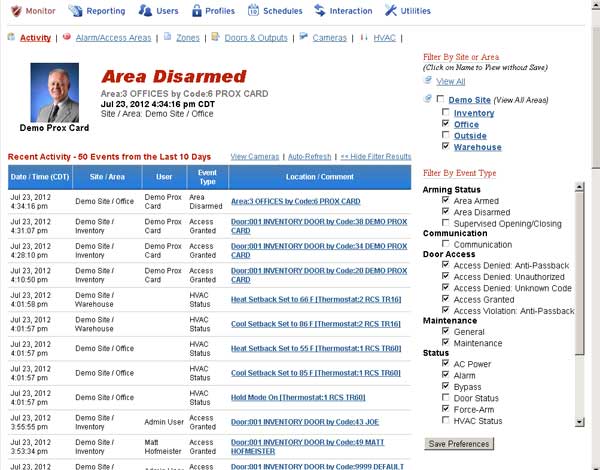
New Filter By Event Type and Save Preferences! - Jul 23, 2012
Now your customer can filter by event type as well as by site and/or area in the Monitor Section. These selections can also be stored and therefore will be set appropriately each time they login.
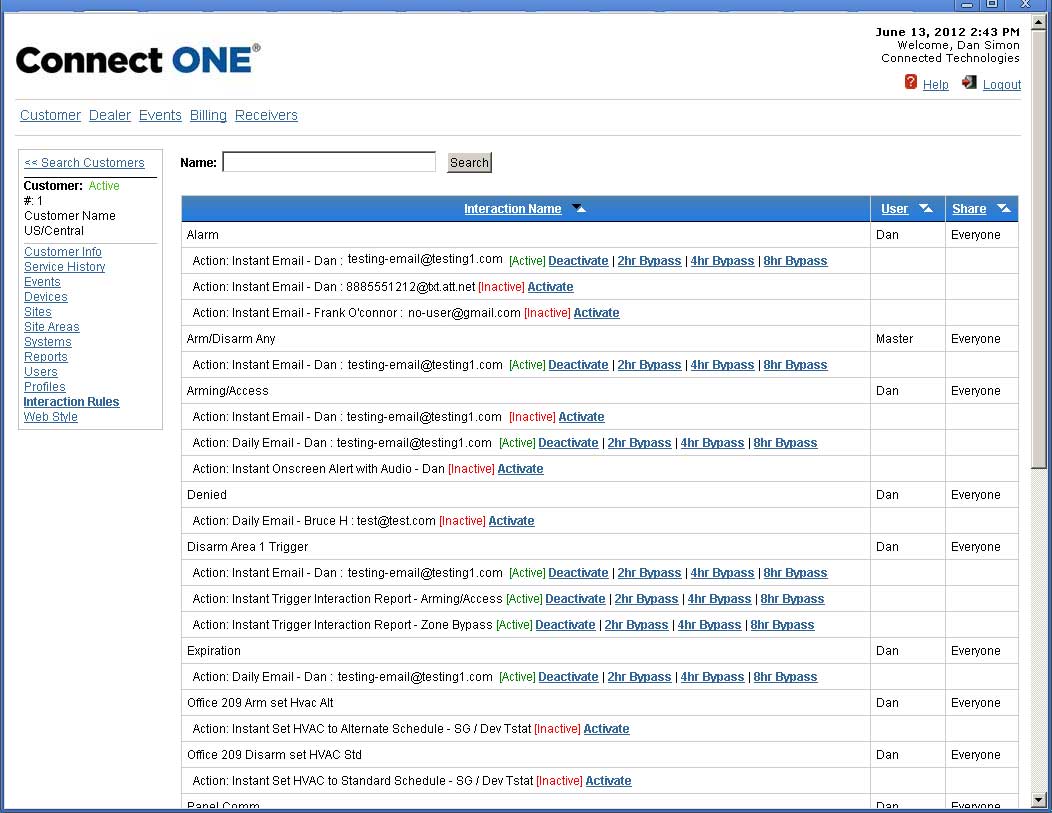
New Temporary Interaction Rule Bypass Feature! - Jun 13, 2012
While testing at a customer's facility, you can now temporarily bypass interaction rules so that you don't drive your customer crazy with emails or text messages from test signals. Each rule can be set individually. You can always reactivate the rule early but just in case you forget, after the selected time, the rule will automatically reactivate.